Why I built a custom MCP server for PageLyft
How I built PageLyft MCP with TypeScript, Bun, Google APIs, and Auth0 to bring SEO and client website operations into my AI tools.
The reason I built PageLyft MCP was practical. At PageLyft, I build and maintain client websites. That work includes checking search performance, setting up analytics, reviewing tracking, and keeping business information current. The data sits in several Google products, while much of my development work happens inside AI tools.
I wanted to connect those two parts of the job. If I’m investigating why a page gets impressions but few clicks, I want the agent helping me to be able to query Search Console. If I’m reviewing tracking, I want it to inspect the actual Tag Manager configuration.
So I built a private Model Context Protocol server that exposes the Google API operations I need.
What MCP does here
Model Context Protocol gives an AI application a standard way to discover and call tools. In this project, those tools are functions such as querying search analytics, reading a GA4 report, or checking a Tag Manager workspace.
The client handles the conversation and chooses which tools to request. My server checks access, validates the input, calls Google, and returns the result. That division matters to me. I can change how I work with an agent without rewriting the Google integrations for every new workflow.
The server is one TypeScript package running on Bun. Its job is to make API capabilities available to my AI clients.
Start with the work behind a client website
Search Console was the first integration. It lets me query clicks, impressions, click-through rate, and average position by dimensions such as page, query, or device. The server also exposes URL inspection and sitemap operations.
The toolset grew to cover other parts of client work:
- Business Profile tools read locations, performance, and reviews. Separate write tools update profile fields, publish posts, and reply to reviews.
- GA4 tools query reports and manage configuration such as web streams and key events.
- Tag Manager tools work with tags, triggers, variables, previews, and container versions.
- Google Ads tools query reporting data and prepare supported campaign changes.
- PageSpeed Insights runs audits on public URLs and returns Google’s response for the requested categories.
For example, I can ask an agent to compare a page’s Search Console performance across two periods, inspect its indexed state, and run a mobile performance audit. Those are separate tool calls. The agent brings their results together, and I decide what to change on the site.
That is the kind of assistance I wanted. Useful account data, available where I’m already working.
Google Cloud provides access; Railway runs the server
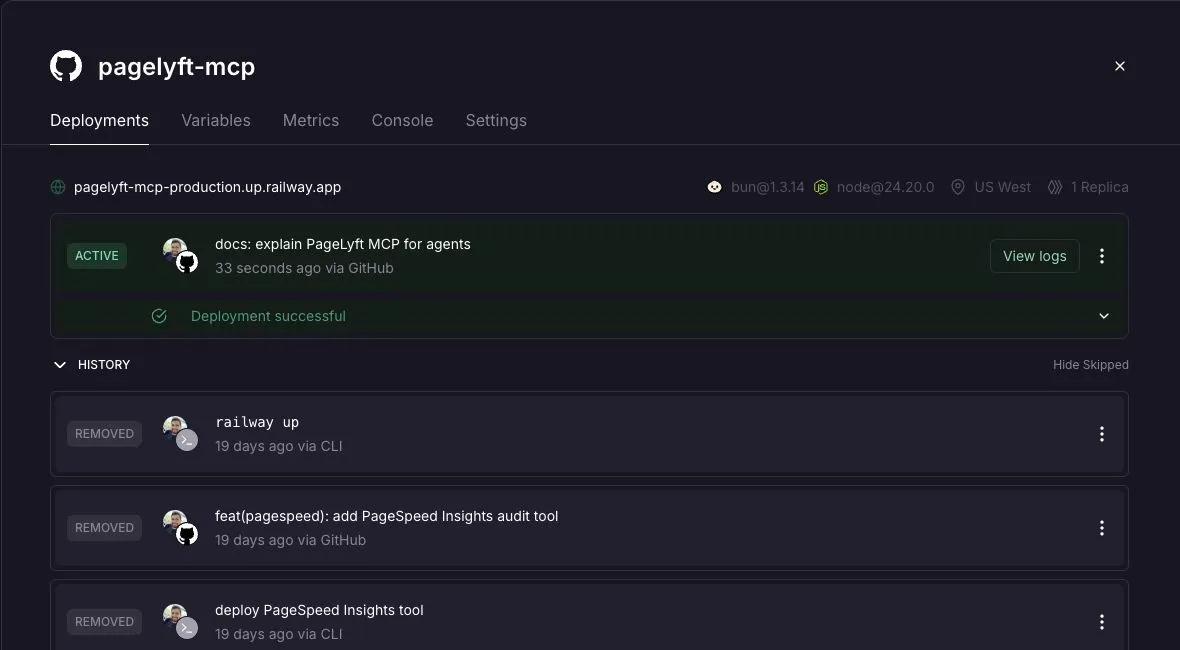
Google Cloud is where the Google API configuration and OAuth credentials live. The MCP server itself runs on Railway. The screenshot above is the actual service, including its successful deployment from the GitHub repository.
There are two distinct authentication relationships. My AI client authenticates to the MCP server through Auth0. The server then uses its Google OAuth credentials to call the upstream services. Google credentials never need to pass through the AI client.
PageSpeed uses an API key instead. Google Ads also needs a developer token and can use a manager account ID. The server only registers the Ads and PageSpeed tools when their additional credentials are configured.
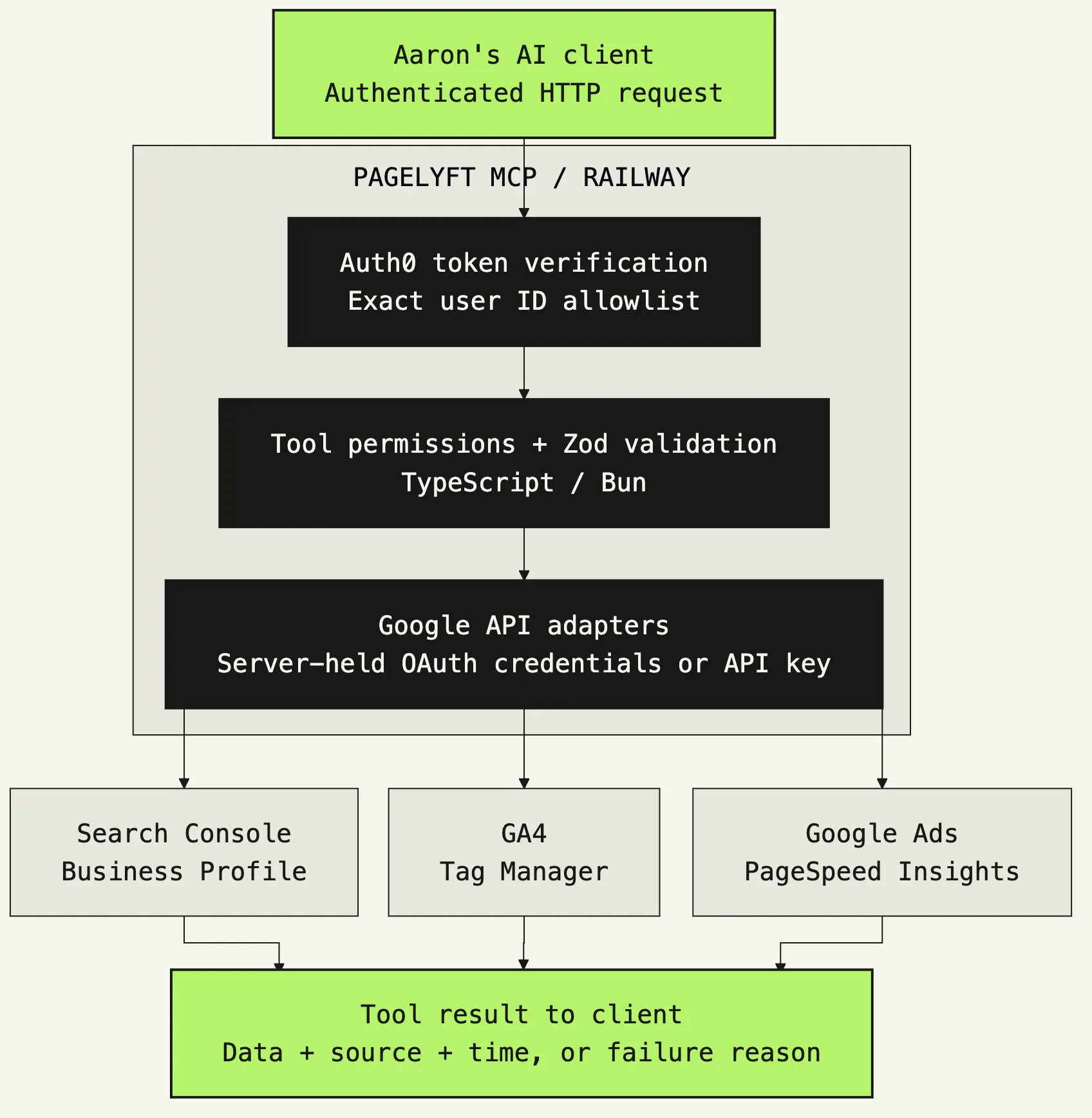
The diagram follows the implementation. A request reaches the HTTP handler, passes the authentication checks, and goes through the tool’s permission and input checks before an API adapter runs it. The response returns to the requesting client.
OAuth alone wasn’t the whole requirement
I wanted this server usable only by me. Authenticating someone tells the server who they are. It still needs to decide whether that person is allowed in.
The server verifies the Auth0 token’s issuer and audience, then compares its user ID with one configured account. Other users are rejected. Each tool also requires its own scopes, so read permissions do not automatically allow profile updates or publishing tracking changes.
This distinction becomes important once tools can write. Replying to a review changes public content. Publishing a Tag Manager version changes live tracking. Those operations need more authority than reading a report.
Google Ads has another deliberate default. Typed mutations run in validate-only mode unless I choose to apply them. New campaigns and responsive search ads default to paused. I want to be able to prepare and inspect a change before it starts affecting a client’s account.
Small tools are easier to reuse
I kept each tool close to an API capability. A search analytics tool takes a property, date range, dimensions, and filters. The agent can reuse it for a quick page check or a longer investigation.
Zod validates incoming arguments. A shared registration function checks tool permissions and wraps results. Successful responses include the data, source, and fetch time. Failures return an unavailable result with a reason.
That last detail is useful when a client account lacks access or an upstream request fails. A missing report should stay missing. The agent can explain the gap instead of turning it into a claim about the client’s traffic.
The API clients are separate from the tool definitions, and tests use injected clients or mocks. I can check input handling and request construction without running test changes against a client’s account.
Why build this for PageLyft?
A website’s value depends partly on what happens after it ships. Search visibility, measurement, and maintenance all need attention. I built this server to bring that work closer to the development process.
It gives me a toolset I control, with the specific Google integrations and access rules I need. The benefit is being able to ask a question about a client’s site and give the agent a direct way to retrieve the relevant data or prepare an authorized change.
You can see the PageLyft MCP project for the shorter technical overview. If you need help building or maintaining a business website, visit PageLyft.
Topics