Cursor's 2025 Year in Review: How I Actually Used AI Day-to-Day
Cursor generated a '2025 Year in Review' snapshot of my editor usage. Here's what the numbers say, what surprised me, and what I'm taking into 2026.
If you’ve been living in your editor this year (same), Cursor has a fun little “Year in Review” recap. It’s a simple screenshot… but it’s also a surprisingly honest mirror of how I work.
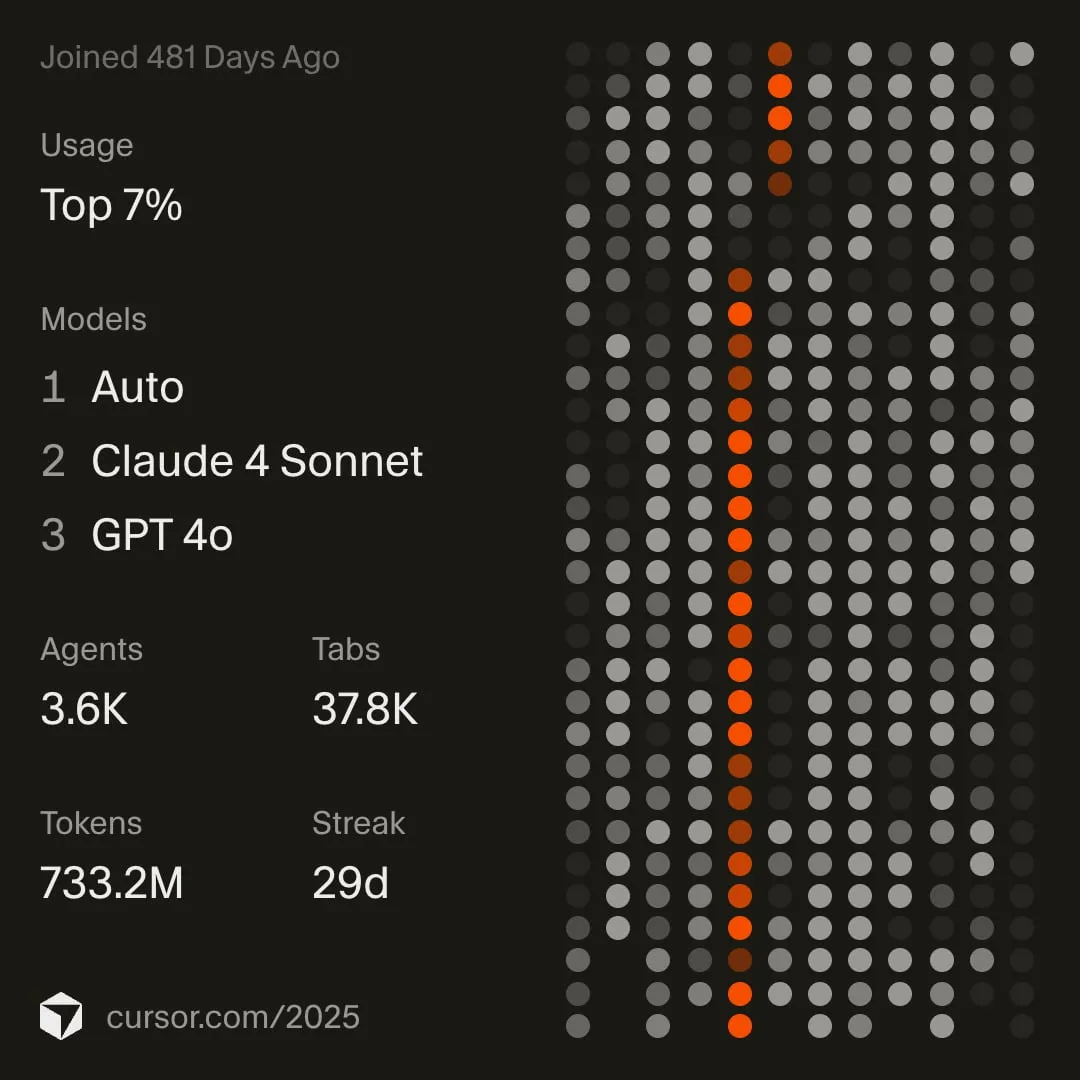
Here’s mine:
The headline numbers
Cursor summarized my year with a few standout stats:
- Joined: 481 days ago
- Usage percentile: Top 7%
- Models: Auto, Claude 4 Sonnet, GPT‑4o
- Agents: 3.6K
- Tabs: 37.8K
- Tokens: 733.2M
- Streak: 29 days
On paper that’s “cool chart, lots of dots.” In practice, it maps pretty cleanly to what my day-to-day looked like this year: more shipping, more iteration, and way more “talking to my codebase” instead of fighting it.
What I was building while all this was happening
Most of my 2025 coding time went into shipping and maintaining Next.js, Astro, and Node.js projects. That mix is basically the perfect stress test for an AI editor workflow: UI work, content work, server-side work, and lots of glue code.
What surprised me (and what didn’t)
Tokens: 733.2M is… a lot
I didn’t feel like I was “using AI all day.” But tokens tell a different story. It’s the little things:
- drafting a function signature before writing the implementation
- asking for edge cases and failure modes
- turning a fuzzy idea into a checklist
- generating quick test scaffolds
- rewriting copy, labels, and docs without breaking flow
The big value wasn’t that AI wrote “the whole app.” It helped me keep momentum when I’d normally context-switch.
Agents: 3.6K = lots of tiny delegations
This number tells me I leaned hard into small, frequent asks:
- “scan this file and summarize what matters”
- “find where this behavior is implemented”
- “refactor this without changing output”
- “add a guard so this can’t blow up in production”
I still want to be the one steering. But letting an agent do the first pass (or the boring pass) saved a ton of time.
Tabs: 37.8K is basically “debugging as a lifestyle”
If you’ve ever chased a bug through a UI, an API, a database schema, and three config files… you get it. Tabs aren’t just “open files,” they’re “how many times I had to keep threads in my head.”
This actually reinforced something I’ve been trying to do more of: reduce investigation time by writing better affordances (logs, typing, explicit contracts, clearer error messages).
The “model mix” is the real workflow
My list showed three slots:
- Auto
- Claude 4 Sonnet
- GPT‑4o
I like that it’s not “one model forever.” I’ve found it’s more like choosing tools:
- Auto is my default when I don’t want to think about it.
- Claude tends to shine when I want deeper reasoning, careful refactors, or longer writing.
- GPT‑4o is great for fast iteration and tight back-and-forth.
The bigger lesson: workflows beat model fandom. Pick what keeps you shipping.
Here’s the model graph from the recap (this tells the real story—what I reached for, and when):
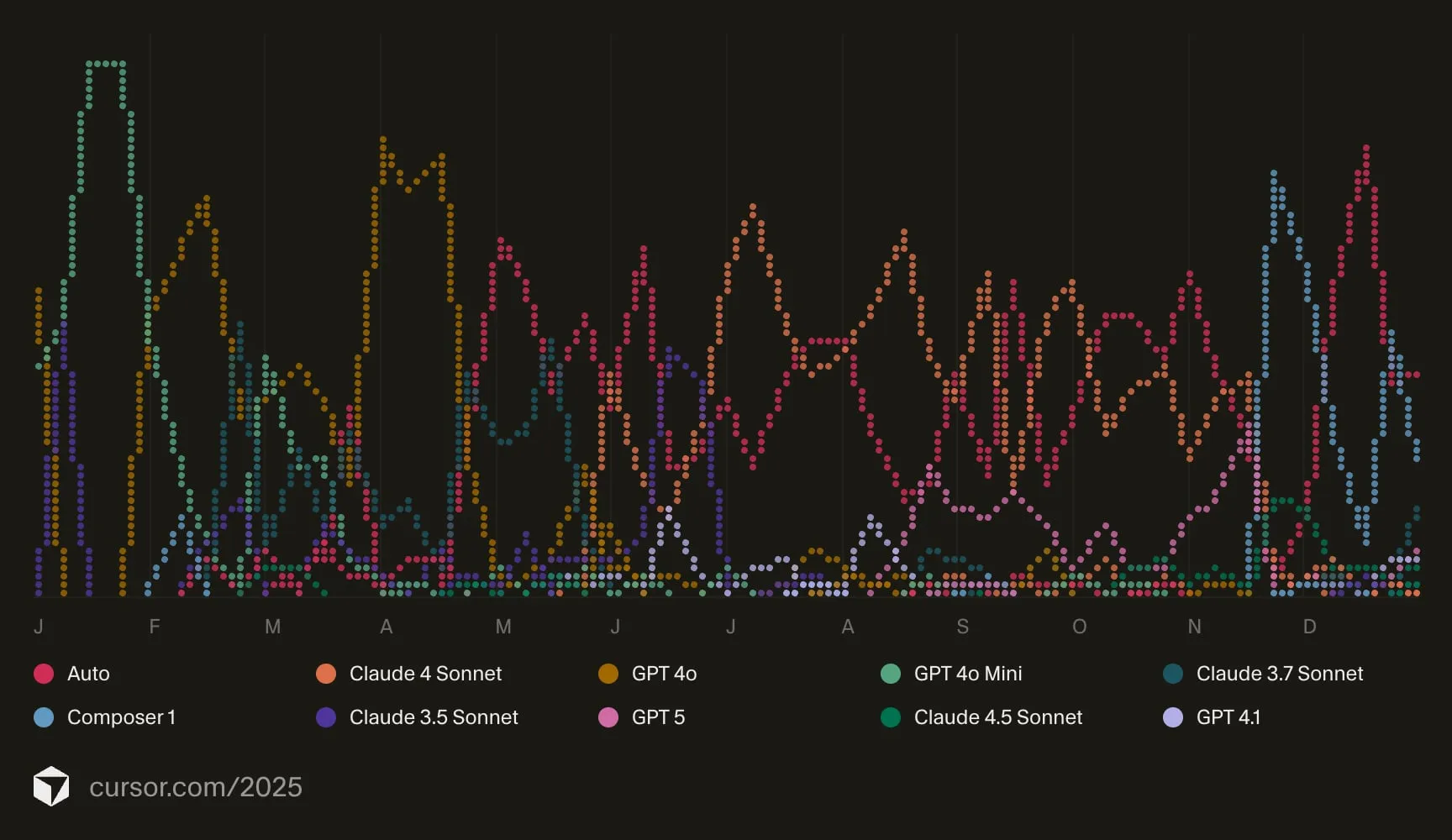
If there’s a pattern in that chart, it’s this: I wasn’t trying to “pick the best model.” I was trying to stay in flow—and different tasks benefit from different strengths.
What this changed for me (concretely)
I write more “decision docs,” even if they’re tiny
Instead of keeping architecture decisions in my head, I’ll often ask AI to help me draft a short note:
- goal
- constraints
- approach
- tradeoffs
- next steps
Even 10 lines prevents a lot of “why did I do this?” later.
I refactor earlier (because it’s cheaper now)
Refactoring used to feel like a tax. With a good agent loop—plan → patch → review → test—it feels like part of the build, not a separate event.
The important part is still the human part: I review everything, and I’m picky about correctness, naming, and failure behavior.
I debug by asking better questions
The best “AI debugging” sessions happen when I stop asking for solutions and start asking for explanations:
- “What would cause this symptom?”
- “Which assumptions in this code are unsafe?”
- “What would you log to confirm the hypothesis?”
That’s when it feels like pairing with someone who’s calm, fast, and never tired.
Codex + MCP servers: the real productivity multiplier
Two things made Cursor feel less like “autocomplete” and more like a proper workbench this year:
- ChatGPT Codex: great for code generation and fast iteration when I already knew the direction and just needed to move.
- MCP servers: this is where things got really interesting—bringing external context straight into the editor so I could take action without tab-hopping.
Some of the MCP servers I leaned on most:
- Figma: pull design context/screens, align spacing and UI details, sanity-check implementation against the source of truth.
- Supabase: inspect tables, reason about RLS/policies, and wire up queries with fewer guess-and-check loops.
- daisyUI Blueprint: grab consistent component patterns quickly while keeping UI work moving.
This is the part I want to do more of: less “paste context into a chat window,” more tools that can read, reason, and operate with guardrails.
Where Cursor helped the most in real projects
The flashy demos are fun, but the day-to-day value came from using Cursor as a best-practices copilot and a quality gate while building real client work.
Best practices, performance, and security checks
I used Cursor constantly to sanity-check implementations before they turned into tech debt:
- Authentication flows: session handling, token storage, CSRF considerations, and “what could go wrong here?”
- Postgres/Supabase design: table modeling, indexes, constraints, and RLS/policy implications
- Performance smells: N+1 patterns, unnecessary re-renders, over-fetching, and “is this going to be slow at scale?”
- Security footguns: common mistakes that lead to vulnerable, underperforming, or brittle code
Not as a replacement for reviews or testing—more like a fast second brain that helps me catch issues earlier, when fixes are cheap.
Better client-facing work (no more Lorem Ipsum)
One underrated benefit: Cursor helped me write and prototype with business context.
When I’m building a client website, I want the demo to feel real. Using the client’s tone, products, and goals makes concepts land faster than placeholder copy ever will. Cursor made it easier to generate content that’s accurate enough to be useful, while still leaving room for refinement.
The tradeoff I noticed: I shipped more, but sometimes felt “slower”
Compared to the years before AI, I coded more and accomplished more in 2025—no question.
But I also noticed something I didn’t expect: sometimes I felt like I was thinking slower, especially when I let the assistant take the lead on complex implementations. It’s subtle, but real: if you offload too much of the hard thinking, you risk training yourself to wait for answers.
So in 2026, I want to be more intentional:
- Use AI heavily for mundane, time-consuming work (refactors, moving logic into the right files, splitting concerns, cleanup)
- Use it for research and best-practice discovery
- Use it sparingly for complex architecture and tricky logic—more like a reviewer than the author
My goal isn’t to “depend less” out of fear—it’s to keep my skills sharp. I still want to use my understanding, my intuition, and my brain. If anything, I want AI to feel like a team of junior developers: I can delegate the easy stuff, review the output, and stay responsible for the decisions.
What I’m taking into 2026
Some personal rules I’m keeping:
- Use AI to preserve flow, not to avoid thinking.
- Prefer small prompts over giant one-shot requests.
- Treat output as a draft until it’s verified by tests, types, or runtime behavior.
- Invest in the boring parts (tooling, docs, error messages). They compound.
I’m excited to see what Cursor does in 2026. I really hope it continues to improve and evolve.
Topics